
Free Pension Pot Tracker
Most of us collect a new pension with every job, and it is easy to lose track. This free pension pot tracker keeps all your pensions in one place, adds up your total pot and shows what it could grow to by retirement.
Free Excel file. Works in Excel, Google Sheets and Numbers. On a phone you may need the free Excel, Numbers or Google Sheets app.
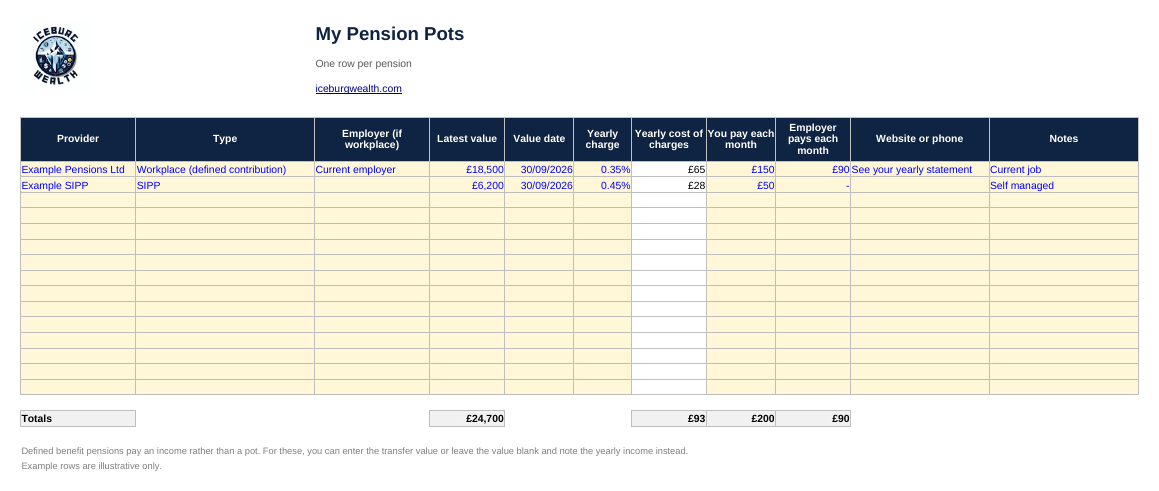
What’s in the Pension Pot Tracker
🗂️ All your pots
Provider, type, value, yearly charge and contributions for up to 15 pensions, with your total pot.
💸 Charges
See what your pension charges cost you in pounds each year, not just as a percentage.
🔮 Projection
Enter your age, retirement age and your own growth assumption to project your pot and 25% tax free cash.
Find Your Lost Pensions
If you think you have a pension from an old job, the government’s free Pension Tracing Service can give you the contact details. It is also worth checking your State Pension forecast.
Keep your pension pot tracker private, and never give your details to anyone who contacts you out of the blue offering to unlock or move your pension.
How to Use the Pension Pot Tracker
You will need your latest statement for each pension. Most providers also show the figures in their app or online account.
Step 1: Download and Open the File
First, download the pension pot tracker and open it in Excel, Google Sheets or Numbers.
Step 2: Add Each Pension
Next, add a row for every pension you have. Enter the provider, the type of pension, its current value, the yearly charge and how much goes in each month. There is room for up to 15 pensions.
Step 3: Enter Your Ages and Growth Rate
Then add your age, the age you want to retire and the yearly growth rate you want to assume. The pension pot tracker projects your total pot at retirement and the 25% you could usually take tax free.
Step 4: Update It Once a Year
Finally, update the values when your annual statements arrive. It only takes a few minutes, and you will spot any pot that is falling behind.
What to Look For on Your Pension Statements
Pension statements can look confusing, but you only need a handful of figures for the tracker.
- The current value of the pot (sometimes called the transfer value)
- The yearly charge, usually shown as a percentage
- How much you and your employer pay in each month
- The scheme type, such as workplace, personal pension or SIPP
- Whether it is a defined benefit (final salary) scheme, which works differently
Defined benefit schemes pay a set income rather than building a pot. So for those, note the yearly income shown on your statement instead.
Why Pension Charges Matter So Much
A charge of 1% a year sounds tiny. However, on a £50,000 pot it costs £500 a year, while a charge of 0.3% costs £150. That gap repeats every year and grows as your pot grows.
That is why the pension pot tracker shows charges in pounds, not just percentages. If one old pension is much more expensive than the rest, it may be worth looking at moving it. Before you do, check for exit fees and any valuable guarantees you could lose.
Pension Pot Tracker FAQs
Does It Include the State Pension?
No. The tracker covers your private and workplace pensions. Check your State Pension forecast on GOV.UK and add it to your plans separately.
What Growth Rate Should I Use?
There is no right answer, as returns are never guaranteed. Many people test a cautious rate and a hopeful rate, for example 4% and 6% a year, to see a range of outcomes.
How Much Can I Take Tax Free?
You can usually take 25% of your pension tax free, up to a lifetime cap of £268,275 for most people, according to GOV.UK. The rest is taxed as income when you take it.
Should I Combine My Old Pensions?
Combining pensions can make them easier to manage and sometimes cheaper. On the other hand, some older pensions have guarantees or protected benefits. So check carefully, or get advice, before you move anything.
Ready to get started?
Download it free, fill in your own figures and let the spreadsheet do the maths.
New to pensions? Read our simple guide to what a pension is and work out how much you need to retire. You can also try our retirement calculator.
This spreadsheet is general information only and is not financial or tax advice. Tax rules can change and depend on your circumstances, so check GOV.UK or speak to an accountant before relying on it. Correct for the 2026/27 tax year, updated October 2026.